



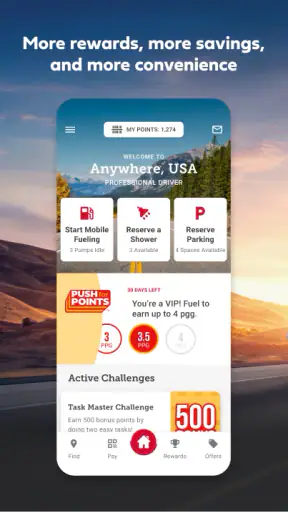
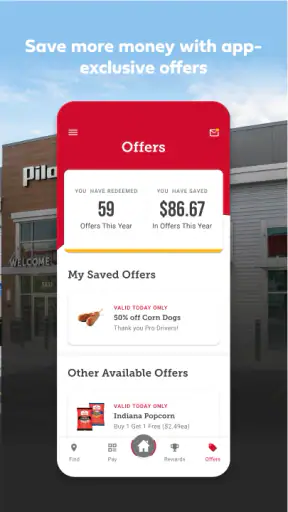
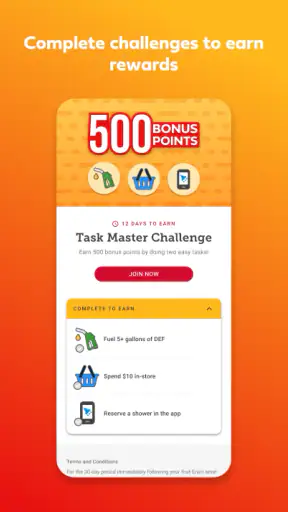
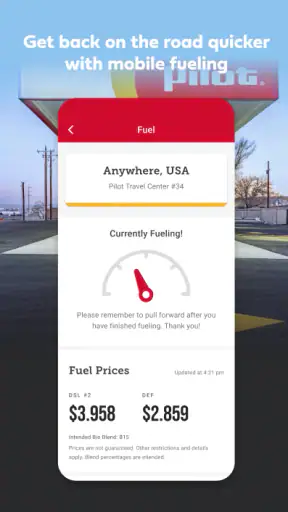
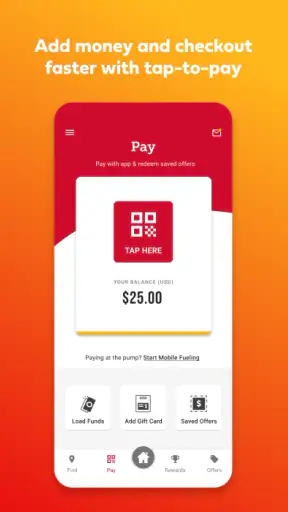

Long-distance driving asks for attention in short bursts: finding fuel before the tank gets uncomfortable, choosing a place to stop, checking whether rewards are useful, and getting back on the road without turning a simple break into a research project. Pilot is built around that routine. I spent time looking at it as a travel and local app rather than as a general map replacement, and my impression is that it works best when your trip already includes Pilot locations. It brings fuel, food, and rewards into one road-focused experience, with enough practical value to reduce repeated searching while travelling.
As a free app from Pilot Flying J, it is aimed at drivers who want a direct connection to the company’s travel centers and services. It is listed for a mature audience aged 17 and over, and it has been available since November 30, 2011. The current release is version 7.13.0, with support beginning at iOS or Android 8.1 depending on the device environment. That long presence helps explain why it feels like a focused companion for regular road users rather than a new travel experiment.
The headline numbers are encouraging: Pilot holds a 4.6 average from around 276 thousand ratings, with more than 1 million installs. I would not treat popularity as proof that every screen will suit every driver, but it does suggest that the app has become a familiar tool for people who regularly use Pilot locations. My recommendation is straightforward: if you plan stops around Pilot, it deserves a place on your phone. If you simply need the cheapest fuel anywhere, another navigation or price-comparison tool may be more useful.
How Pilot supports different drivers and travel situations
Readable navigation for quick decisions
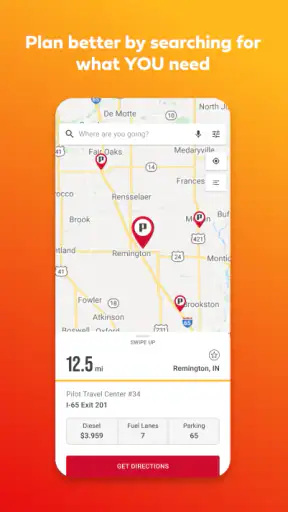
The most important design test for a road app is not how attractive it looks while sitting at home. It is whether I can understand the next step when I am tired, carrying luggage, or preparing to leave a busy service area. Pilot’s purpose gives its navigation a useful focus: instead of presenting every possible business nearby, it centers the information around Pilot travel stops, fuel, food, and rewards. That narrower scope can make a planned stop easier to manage than a broad local-search app.
I found the app easiest to approach when I already knew what I wanted: locate a Pilot stop, inspect the available travel-center information, or manage the rewards side of a visit. The structure is more practical than exploratory. Someone who enjoys browsing restaurants, attractions, and independent fuel stations may find it less flexible than a full maps application, but that is also why it can feel less distracting for a driver planning a specific stop.
For readability, I would use it before pulling away rather than trying to study details while moving. A passenger can handle the search during a trip, while the driver can keep attention on the road. This is not merely a safety preference; it is also a usability advantage. Travel apps often become frustrating when a user must remember a location, compare several cards, and make a decision under time pressure. Pilot is more useful when I prepare the next stop during a break, then rely on the phone’s normal navigation tools for the actual route.
One practical habit is to decide whether the stop is for fuel, food, a rest break, or rewards before opening the app. That small step reduces wandering through screens and makes the app’s focused design work in your favor. It is particularly helpful for someone who prefers a predictable sequence instead of a large map filled with unrelated choices.
The app’s short store description is simply “Pilot,” while its broader purpose is much clearer in use: it ties a Pilot visit to the services a road user is likely to need. That distinction matters for new users. Do not install it expecting a complete replacement for a mapping service, public-transit planner, or city guide. Think of it as a brand-specific travel companion that can complement those tools.
Motor effort, vision, hearing, and cognitive load
For users with limited hand movement, the main question is how much tapping and typing a task requires. A stop-finding workflow is naturally easier when the destination can be selected from a short list or map rather than entered repeatedly. I still would not operate the app while driving. Repeatedly holding a phone, zooming, correcting a search, or reading small details creates unnecessary motor demand at exactly the wrong moment.
Drivers with low vision may appreciate the simple subject matter compared with a general travel app, but the usefulness of that simplicity depends on the legibility of each device’s display and the user’s system settings. I would increase text size or display scaling before a trip and test whether important labels remain comfortable to read. Larger text can improve comfort, although it may also cause more scrolling or make a busy screen feel less compact. That is a worthwhile trade-off to check at home, not at a roadside exit.
Color perception is another reason to avoid relying on visual markers alone. When comparing locations or status information, I would read the written labels and confirm the selected destination instead of assuming that a color difference communicates everything. This is a good general rule for travel apps: a map pin can look obvious in a quiet room and become easy to miss in glare, rain, or a vibrating vehicle.
Hearing-related needs are less central here than in an audio-navigation product because the app’s core value is visual planning around Pilot services. A person who cannot rely on spoken prompts can still use it as a stop-planning tool, then choose a navigation method that presents directions visually. Conversely, someone who depends heavily on voice guidance should not expect this app alone to provide the complete spoken driving experience. Its role is deciding where to stop; the navigation system you already trust may remain better for getting there.
The strongest accessibility benefit is reduced cognitive switching. A driver who regularly visits Pilot does not need one app for the company’s locations, another for rewards, and a third for deciding what kind of stop is available. Bringing those needs closer together can make a routine less mentally expensive. The limitation is that the app’s usefulness drops sharply when the journey is not centered on Pilot, so the reduced load only applies within that particular travel pattern.
Using the app in realistic roadside conditions
Imagine leaving work for a long evening drive with a low fuel level, a passenger who needs food, and no desire to improvise at the next exit. I would open Pilot while parked, search for a suitable Pilot stop along the route, review the practical options, and let my usual navigation app handle the approach. At the stop, I could use the Pilot app again for the rewards part of the visit instead of searching through unrelated travel content. This is the kind of ordinary, repeated workflow where the app earns its space.
For truck drivers and other professional road users, the appeal is even more specific. A planned travel-center stop can combine several errands, and keeping the company’s fuel, food, and rewards information together may be more convenient than checking separate sources. However, convenience should not be confused with complete trip planning. A professional driver may still need dedicated tools for route restrictions, scheduling, parking decisions, weather, and regulations. Pilot can support the stop itself without replacing a broader work setup.
For families, the app can help a passenger prepare the next break while the driver concentrates on traffic. That division of labor is important for inclusive use: the person operating the phone does not have to be the person driving. It also helps users who find small controls or dense information tiring, because a passenger can take the time to zoom, read, and confirm details without creating pressure for the driver.
For someone travelling through an unfamiliar region, the app is most valuable when Pilot is already a preferred stop. If the priority is finding an accessible independent restaurant, a quiet attraction, or the lowest fuel price across every brand, a general maps service will usually offer broader coverage. I would use Pilot as a specialized layer, not as the only source of local information.
Connectivity and roadside conditions also shape the experience. A phone can be difficult to use in direct sunlight, with gloves, during rain, or when the user is standing beside a noisy pump. I would plan the important part before leaving and avoid depending on last-second interaction. Saving a mental note of the intended exit and stop is sensible even when an app is working perfectly, because a phone battery, signal, or attention span can change during a journey.
Rewards, routines, and the trade-off between convenience and commitment
The rewards element is one of the reasons a regular Pilot customer may prefer this app over a generic map. Instead of treating each stop as an isolated fuel purchase, the app gives the visit an ongoing account-related context. That can make sense for people who already choose Pilot often and want their routine in one place.
The trade-off is commitment to one network. If I am willing to pass several Pilot locations to find a better price elsewhere, the rewards convenience may not outweigh the broader choice offered by a fuel-price app or general map. The right decision depends on how consistently Pilot fits your routes. Occasional users may gain basic stop-finding value without needing to build their whole travel routine around the app, while frequent users are more likely to benefit from keeping it installed.
A useful workflow is to separate planning from redemption or account tasks. I would first choose the stop based on the route and immediate need, then deal with rewards when parked. This prevents the rewards layer from distracting from the practical decision of whether the stop is actually convenient. It is a small distinction, but it matters for people who are easily overwhelmed by loyalty programs or who prefer to keep travel decisions simple.
I also like the possibility of using the app as a memory aid for a familiar road routine. Rather than asking a passenger to remember every preferred stop, I can use the app to begin the search and then confirm the choice together. For users with cognitive disabilities, fatigue, or anxiety around unfamiliar journeys, a repeatable stop-planning ritual may be more useful than a long list of features. The app cannot remove all uncertainty, but it can make one part of the trip more predictable.
Where the experience still creates barriers
The first barrier is brand dependence. Pilot is not a neutral travel directory. Its value is concentrated around Pilot Flying J locations and related services, so a user who wants a complete picture of every nearby option will need another app as well. That extra switching can be inconvenient for people with limited attention, small screens, or slower reading speed.
The second barrier is the roadside environment itself. Even a well-organized screen is not automatically easy to use at a fuel pump. Glare, noise, cold weather, gloves, fatigue, and a moving vehicle can all make touch interaction harder. My practical answer is to complete searches while parked, use a passenger where possible, and treat the app as a planning aid rather than a driving interface.
There is also a potential learning curve around deciding which part of the app matters for a particular visit. A new user may arrive wanting only fuel information and encounter a broader combination of food and rewards content. That is not inherently confusing, but people who prefer a single-purpose screen may need a few visits to establish their own quickest route through it.
Older devices can introduce another consideration. The app supports operating systems from version 8.1 onward, which makes it available to a wide range of compatible phones, but compatibility does not guarantee a comfortable experience on every older handset. A smaller screen, slower performance, or weak battery can make any travel app less pleasant. I would test it at home before relying on it for a long trip, especially if the phone is also needed for emergency calls and navigation.
The mature age classification is worth noticing for families. It means parents should review whether the app fits their household’s device rules rather than assuming that a fuel-and-food tool is automatically suitable for every child’s phone. In normal use, the app is aimed at adult travellers, drivers, and passengers managing a road stop.
Finally, the app does not eliminate the need for judgment. A listed stop may be convenient geographically but unsuitable for a particular break, passenger, vehicle, or schedule. Users with mobility, sensory, or medical needs should still verify the practical conditions that matter to them before committing to a stop. The app can help narrow the choice, but it should not be treated as a substitute for personal confirmation.
My inclusive verdict for road users
After using Pilot as a travel companion, I see its strongest quality as focus. It brings a specific road-stop routine into one place and can reduce the mental effort of finding fuel, considering food, and keeping rewards connected to a Pilot visit. That is particularly useful for regular customers, passengers who help plan trips, and drivers who prefer a familiar brand-centered workflow.
Its inclusive value comes less from a long list of specialized controls and more from how it can support different roles. A passenger can operate it for the driver. Someone who prefers visual planning can use it before switching to a navigation tool. A tired traveller can repeat a known process instead of starting a broad local search. Users with motor or sensory limitations can prepare while stationary and adjust their phone’s display settings to make reading easier.
At the same time, I would not recommend relying on it alone for every journey. It is a poor fit if you need all fuel brands, detailed city discovery, comprehensive accessibility information, or a complete navigation replacement. Its focused design becomes a limitation outside the Pilot ecosystem, and roadside use can still be physically and cognitively demanding.
My bottom line is that Pilot works best as a planned-stop companion, not as your entire travel toolkit. It is free, established, and well regarded by a large user base, but the real question is whether Pilot locations match your regular routes. If they do, the app can make repeated trips more organized and less tiring. If they do not, keep a broader maps or fuel-search option as your main tool and use Pilot only when its network is the stop you have chosen.


